


Manus AI
4.63.92K Reviews
App Specs
- Version
- 26.14.1
- Updated On
- License
- Free
- Downloads
- 10,000,000+
- Developer
- BUTTERFLY EFFECT PTE. LTD.
- Categories
- Productivity
- Platform
- Android, iOS
Screenshots
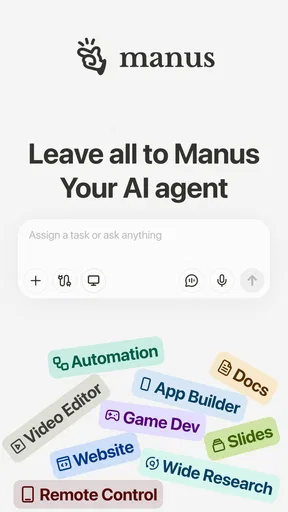




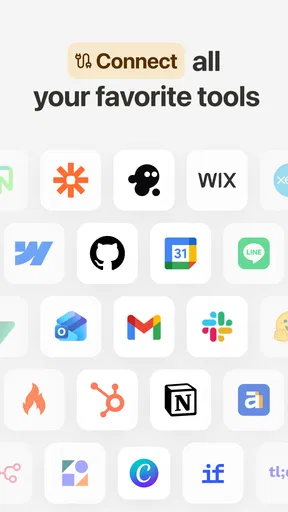
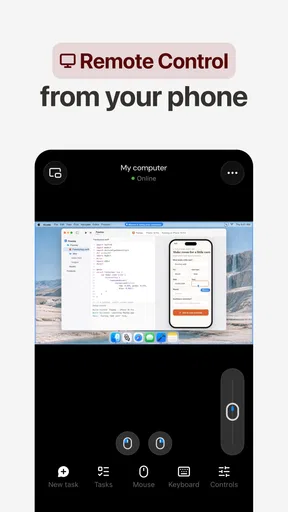
 Analysis by AppCompare
I find the most useful way to think about Manus AI is as a place to hand off small, messy productivity tasks and get help turning them into something more workable. That can mean shaping a rough idea into a draft or asking for help organizing information. The appeal is not simply that AI can produce text; it is that a conversation can help me move from “I need to do this” to a clearer next step. Whether that saves time depends on how specific I am and how carefully I check the result.
A conversational assistant, not a finished answer machine
Manus AI is a free productivity app from BUTTERFLY EFFECT PTE. LTD. Its store summary, “Leave it to Manus,” points toward delegating work, while the short description identifies it as an AI app. I would approach that promise with a practical mindset: ask it to help with a bounded task, then review what comes back rather than treating the output as ready to send or publish. That distinction matters because generated text can sound confident even when it needs correction.
The app has an average rating of 4.6 from around 225,000 ratings, and it has passed over a million installs. Those figures suggest that many people have tried it, but they do not tell me whether it suits a particular workflow. I would judge it by whether its responses are useful for the tasks I actually repeat, and whether checking those responses takes less effort than doing the work another way.
How I would use it during an ordinary workday
Imagine I have a meeting coming up and a jumble of notes about what needs to be discussed. I could use an AI assistant to help turn that material into a short agenda, then ask for a clearer version of a follow-up message after the meeting. The practical value is in the back-and-forth: I can explain the audience, set a tone, and request a more concise draft. I still need to confirm names, decisions, dates, and commitments before sharing anything.
For better results, I would give Manus AI context in small, relevant pieces rather than paste a vague request and hope it guesses what I mean. A useful prompt might explain who will read the draft, what it needs to achieve, and what details must stay unchanged. If the first answer misses the mark, asking for one specific adjustment—such as a warmer opening or a shorter conclusion—is easier to evaluate than asking it to “make everything better.” This also helps me notice when the assistant has changed a meaning I wanted to preserve.
That workflow is particularly handy for blank-page friction. I can ask for an outline before drafting, compare a couple of possible structures, or use a rough first pass as material to edit. I would not rely on an AI-generated response as evidence, expert advice, or a substitute for checking source material. For work involving sensitive details, I would also think carefully before entering information into any AI service and follow the rules that apply to my workplace or project.
Where it fits among writing and productivity tools
Compared with a conventional notes app, Manus AI is more suited to helping transform an instruction or a rough thought into a response; a notes app is usually the better home for information I want to preserve exactly and retrieve later. Compared with a standard word processor, an AI assistant can help me brainstorm or revise, while the word processor remains the safer choice when precise formatting, careful version control, or a polished final document is the priority. I see them as tools with different jobs, not replacements for one another.
Worth Reading Before You Choose

EA SPORTS FC Mobile 26 Is a Bigger Football Game, but It Takes Time

Flipboard Shows What News Apps Must Do Beyond the Feed

Switching to Android Auto Means Rethinking Your Driving Routine

Google Calendar Makes a Crowded Week Easier to Manage

Ludo King Makes the Most of the Minutes Between Plans

Baby Panda World Brings Quick Play to Modern Phones, but Its Game Library Feels Busy
It also differs from a search engine. Search is the better starting point when I need to locate original sources or verify a current fact. A conversational AI can help me frame a question, summarize material I provide, or draft an explanation, but I would verify factual claims before relying on them. That extra check is not a minor detail: it is part of the work whenever accuracy matters.
Getting Started with Manus AI
When you first launch Manus AI, the interface greets you with a sleek and intuitive design. It's like the developers knew exactly how to make everything accessible without overwhelming you. Setting up is a breeze; just a few taps, and you're ready to dive into your writing projects.
The app offers a variety of templates to get you started, whether you’re working on a novel, an article, or even a simple blog post. Not feeling creative? No problem! The inspiration prompts are there to kickstart your creativity. It’s like having a muse who never complains or demands coffee breaks.
Features That Stand Out
One of the coolest features I found is the real-time collaboration tool. Imagine working on a document with your friend or colleague, and both of you can edit and comment simultaneously. It’s a lifesaver for team projects. Plus, the AI suggestions are a game-changer. They help refine your writing style without stripping away your unique voice.
Another nifty feature is the built-in grammar and style checker. It’s not just about catching typos but also enhancing readability. The app suggests alternatives for overused words, helping you sound more eloquent and professional. Seriously, it’s like having an editor in your pocket who’s always on call.
Using Manus AI for Different Writing Needs
Whether you’re drafting an epic fantasy novel or a concise business report, the adaptability of Manus AI is impressive. The app doesn’t box you into a particular format. Instead, it offers flexibility, allowing you to experiment with different writing styles and structures.
For those in academia, the citation tool is a huge plus. No more fumbling around with manual citation formats. The app does it for you, ensuring everything is spot on according to the required style guide. It’s these small touches that make a big difference in streamlining your workflow.
Keeping the output useful and trustworthy
Even when a draft reads smoothly, I would treat it as a working version. A practical check is to compare every factual statement against the notes or sources I started with, then read the text once for tone and once for meaning. Those are different passes: a sentence can sound polished while quietly changing a qualification or leaving out an important exception. For a message that carries a commitment, I would pay special attention to dates, amounts, names, and what I am promising to do.
Another useful habit is to ask for a structure before asking for finished prose. For example, I might request a brief outline for a report, correct the order myself, and then develop only the sections that need drafting help. This keeps me in control of the argument and makes it easier to spot invented connective details. If I already have a strong first draft, a narrow request—such as identifying unclear transitions—usually gives me more control than handing over the whole piece for a broad rewrite.
Who is likely to get the most from it
I can see Manus AI being most useful to people who regularly face a blank page, need help organizing thoughts, or want a quick starting point for routine writing. Students may find an outline helpful as a planning aid, but they should follow their institution’s rules and do their own research and analysis. A small-business owner might use an assistant to sketch a first version of a customer update, then check every operational detail before sending it. In both cases, the person using the app remains responsible for the final work.
It is less suitable for someone who needs exact, source-backed answers without review, or whose work depends on strict formatting and precise control from the first keystroke. If my main need is storing notes, managing tasks, or locating trustworthy sources, I would choose a dedicated tool for that job and use AI only where it adds a clear step-saving benefit. People who dislike conversational editing may also prefer a familiar document editor, where every change is visibly under their control.
Cost, compatibility, and a sensible first test
The app is free to download, with in-app purchases listed from $18.99 to $999.99 per item. I would start with a small, low-stakes task before considering any purchase: for instance, ask it to organize a non-sensitive list of ideas into an outline, then see whether the result genuinely saves editing time. That gives me a more useful basis for deciding than assuming every AI feature will fit my routine. The age rating is Everyone, but that does not make every generated answer suitable for every reader or purpose.
The current version is 1.71.2, and the app requires Android 7.0 or later. It was released on April 23, 2025. If I rely on a particular workflow, I would check that it works on my device and in the way I intend before making it central to a project. I would also keep an independent copy of important work in the system I normally use, rather than letting any one app become the only place a valuable draft exists.
Why Manus AI is Worth a Try
If you’re someone who values productivity and efficiency without compromising on quality, Manus AI is definitely worth exploring. What I love most is that it caters to both seasoned writers and novices alike. The learning curve? Practically non-existent. You’ll find yourself navigating through features like a pro in no time.
Let’s not forget about the app’s cross-platform compatibility. Your projects automatically sync across devices, ensuring you can pick up right where you left off, whether you’re on your phone, tablet, or desktop. It’s perfect for those who are always on the go.
In conclusion, Manus AI is more than just a writing tool; it’s an experience. It transforms the way you approach writing, making it a more engaging and less daunting process. Whether you’re penning your first novel or drafting a crucial report, this app will be your steadfast companion. So why not give it a shot and see how it can elevate your writing game?
Pros
- Intuitive interface simplifies use.
- Customizable AI models enhance flexibility.
- Supports multiple language processing.
- Efficient real-time data analysis.
- Excellent customer support available.
Cons
- Limited offline functionality.
- Requires a stable internet connection.
- Subscription cost may be high.
- Complex features need learning curve.
- Occasional minor bugs reported.
FAQs for Manus AI
What is Manus AI and what are its main features?
Manus AI is a cutting-edge application designed to enhance productivity and creativity through advanced AI algorithms. It offers features such as intuitive text generation, seamless integration with various platforms, and customizable templates. The app is perfect for writers, marketers, and professionals looking to streamline content creation and brainstorming processes.
Is Manus AI available for both Android and iOS devices?
Yes, Manus AI is available on both Android and iOS platforms, ensuring wider accessibility for users across different devices. The app is optimized for performance on mobile devices, allowing users to enjoy the same features and functionalities whether they are using a smartphone or a tablet.
Does Manus AI require an internet connection to function?
While Manus AI can perform some basic functions offline, an internet connection is necessary for accessing its full suite of features. The app relies on cloud-based AI processing to deliver accurate and up-to-date content suggestions and enhancements, which are best utilized with a stable internet connection.
Are there any subscription fees or in-app purchases with Manus AI?
Manus AI offers a free version with limited features, but to unlock its full potential, users can opt for a subscription plan. The subscription provides access to premium features, such as advanced AI tools, priority support, and regular updates, ensuring users get the most out of their experience.
How user-friendly is Manus AI for beginners?
Manus AI is designed with user-friendliness in mind, making it accessible even for beginners. The app features an intuitive interface and provides detailed tutorials and guides to help new users understand its functionalities. Additionally, it offers responsive customer support to assist with any queries or technical issues.


